Template
58th Floor AI Trend 2: Hand-Wave Dance AI Video Generator
Generate a 14.9-second 9:16 clip with the 58th Floor AI Video Generator: synced hand-wave dance and mic push-in. Starts at 20 credits.
- Photos
- 2 photos
- Length
- ~14.9 s
- Format
- 9:16
- From
- 20 credits
Example video: the original 58th Floor clip by @colorsxstudios on TikTok.
Use everyday photos of yourself or friends who agreed to appear. Photos of public figures, and film or music video stills, won't pass review.
About the 58th Floor AI Trend 2 Hand-Wave Template
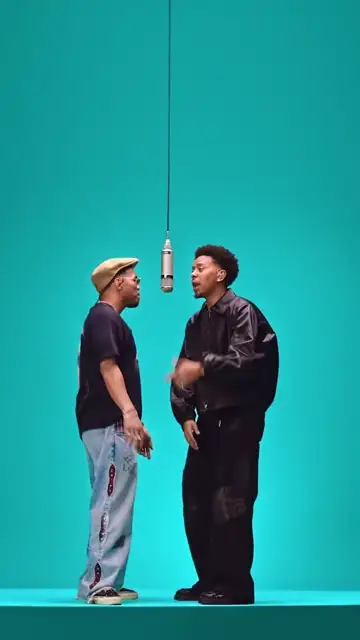
The 58th Floor AI Trend 2 template turns two photos into a 14.9-second 9:16 AI video of the 58th Floor trend's hand-wave take: two friends dance in sync in a teal studio under a hanging silver mic while the camera pushes in from a full-body shot to a close-up. The left photo is the person on the left of the hanging mic, who moves closer to the mic in the middle of the clip. The right photo is the person on the right of the hanging mic, who moves with them and looks into the camera at the end. Pick a Backdrop color, add your two photos, and generate. Prices start at 20 credits.
Original clip by @colorsxstudios
What this 58th Floor take is
This take of the 58th Floor trend is all about sync. In the teal studio, the pair hits the same hand-wave routine side by side, swaying their arms across the body in time, and the camera keeps moving in, from full body to waist up to a tight close-up at the mic.
The left slot is the person on the left of the hanging mic, who moves closer to the mic in the middle of the clip. The right slot is the person on the right of the hanging mic, who moves with them and looks into the camera at the end. Add two photos, one for each person. Outfits come from the photos you upload.
Where the 58th Floor clip comes from
The example video on this page is the original 58th Floor clip by @colorsxstudios on TikTok. Your video follows the same moves, cuts and timing, with you and a friend in the studio.
58th Floor AI Trend rebuilds the routine as a depth-map video, a grayscale motion guide that carries the hand-wave timing and the steady camera push-in. Your photos supply the people, and the Backdrop you pick supplies the studio color.
Timeline
The original clip
Posted by @colorsxstudios on TikTok.
5 November 2026
The 58th Floor AI Trend 2 template went live on 58thflooraitrend.com alongside Trend 1.
The beats this template keeps
Full-body sync
Both people dance the hand-wave routine on the studio platform, matching each move.
The push-in
The camera moves closer beat by beat, from full body to waist height, while the routine keeps going.
The mic finish
A tight close-up shows both people at the hanging mic. The left person moves in toward the mic, and the right person looks into the camera.
What this template keeps and what you choose
Kept
The hanging silver mic, the platform stage, the continuous push-in, and the 14.9-second 9:16 length.
Kept
The beat order: synced hand-wave, push-in, mic close-up.
Yours
The two people come from your photos. The left slot stands on the left of the hanging mic and moves closer to the mic in the middle. The right slot stands on the right, moves with them, and looks into the camera at the end.
Yours
The Backdrop color: the original studio teal or one of 8 colors.
How it works
How to Create a 58th Floor AI Trend 2 Video
- 01
Pick the template
In the homepage form, switch to 58th Floor AI Trend 2.
- 02
Add two photos
Left slot for the person on the left of the hanging mic. Right slot for the person on the right.
- 03
Choose a Backdrop
Pick the original studio teal or one of 8 colors. The preview updates right away and the finished video uses the same color.
- 04
Generate
Review the price shown, then generate. If you need to sign in or top up, your photos and settings are kept and generation continues right after.
- 05
Download
Save the MP4 from your history and post it.
Photo tips
- Use a full or half-body photo of one adult who agreed to appear, with clear face and hands. The routine is all hands.
- Plain light and a simple background give the cleanest result. Your own everyday photos work best: real friends, no logos.
How to post your 58th Floor video
- You get a 9:16 MP4 of 14.9 seconds with music, ready for TikTok, Reels and Shorts. Add #58thfloor and #58thflooraitrend.
- Label realistic AI video as AI-generated where the platform asks. Credit the original clip to @colorsxstudios when you share it.
- Uploaded photos stay in your history for 30 days. Finished videos stay in your account. Download what you want to keep.
FAQ
58th Floor AI Trend 2: Questions & Answers
It is the synced take of the 58th Floor trend: two people do the same flowing hand-wave routine in a teal studio while the camera pushes in to the mic.
Full-body synced dancing, a steady push-in, and a two-person close-up at the mic. The left person moves closer to the mic in the middle, and the right person looks into the camera at the end.
On the homepage, choose Trend 2, add two photos, pick a Backdrop color, and generate. The 14.9-second video starts at 20 credits.
The left photo is the person on the left of the hanging mic, who moves closer to the mic in the middle. The right photo is the person on the right of the hanging mic, who moves with them and looks into the camera at the end.
Two. Add two photos, one for each person, so the synced routine has both of them in the studio. Prices start at 20 credits.
The original studio teal matches the source clip. Backdrop offers the original studio teal or one of 8 colors, and the finished video uses the color you pick.
Choose Trend 2 for a synced dance with a cinematic push-in, or Trend 1 for step-and-clap energy and a close-up at the mic. Both use the same studio, and you can make both.
A full or half-body shot with clear hands. The video is a 14.9-second 9:16 MP4 with music, usually ready in minutes.
It is the example video at the top of this page, by @colorsxstudios on TikTok.
Sources: 58th Floor AI Trend 2 template page · Original clip: @colorsxstudios on TikTok · Privacy · Acceptable use · TikTok: AI-generated content labels
2026-11-05: Published the 58th Floor AI Trend 2 template page, with the original clip credited to @colorsxstudios.
58th Floor AI Trend 1: the default 58th Floor take, with step and clap and a close-up at the mic.
Templates
More templates
Same photos, a different scene.